Let’s work together
Want to discuss potential opportunities? Pick the most suitable way to contact us.
Book a call+370 5 2 780 400
info@ba.lt
Indexes play a key role in keeping large datasets fast and responsive. As a senior Progress OpenEdge developer, I see how often performance issues trace back to missing or misconfigured indexes. I was reminded of this recently when a testing environment started timing out because a table was growing quickly without the needed indexes.
This is a good example of how much impact proper indexing can have. In this blog post, let’s look at why indexes matter and how they work.
To make this clearer, it’s worth taking a closer look at what happened in my case and why indexing mistakes can escalate so quickly. Missing or incorrect indexes can quickly create performance issues. In my case, a repayment log table was growing by hundreds of thousands of rows each day. Without indexes, every query required a full table scan, which slowed the system to a point where users experienced timeouts.
In testing, this is inconvenient. In production, it’s critical: adding indexes requires shutting down the database, planning downtime with several teams, and making sure no disruption to end users. A small oversight can turn into operational delays, lost productivity, and a poor user experience.
This brings us to the basics of what an index is and how it works in OpenEdge. An index in Progress OpenEdge, like in most relational databases, is a separate data structure that helps the database find information quickly. Instead of scanning an entire table, the engine uses the index to jump straight to the relevant rows.
A simple way to imagine is to think of the index at the back of a book. You look up a keyword and go directly to the page you need. An OpenEdge index works in the same way: it guides the database to the right place without unnecessary searching.
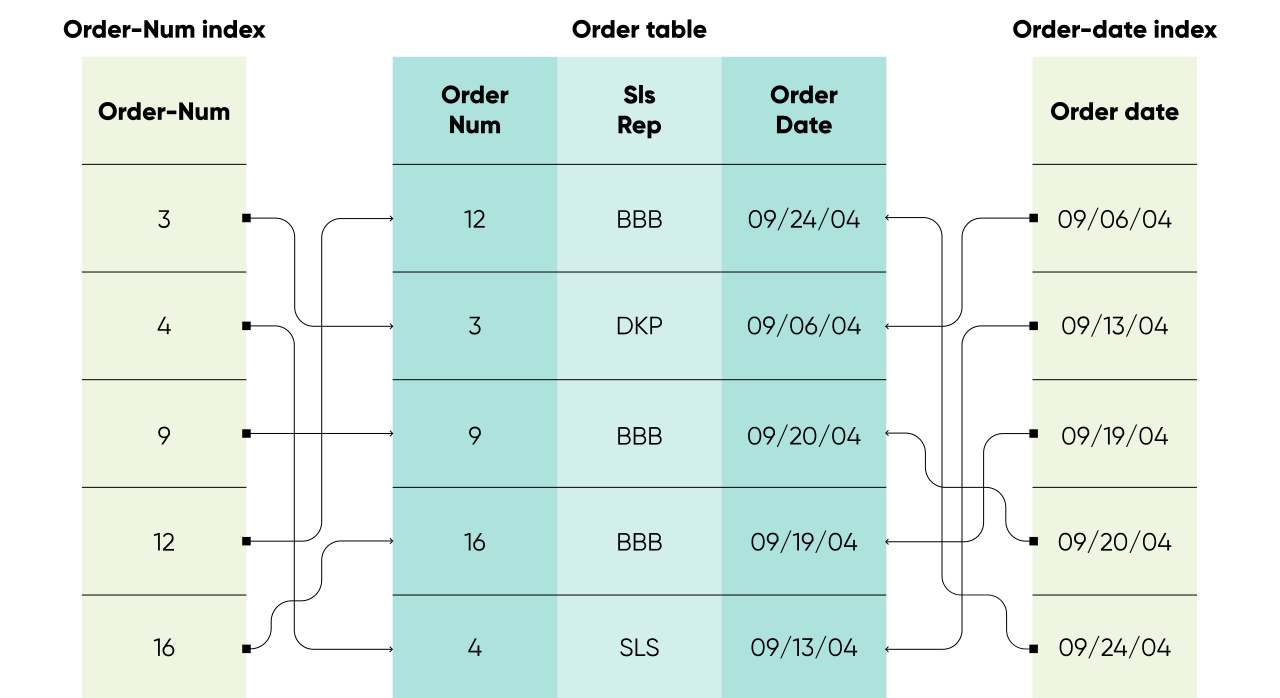
Here is what this looks like in practice. Imagine a table that holds millions of customer records. If you run a query to retrieve orders from a specific region, but there is no index on the region field, OpenEdge must scan the entire table to find the matching rows. This process is slow, resource-heavy, and becomes more expensive as the data grows.
Without the right indexes, you may experience:
A missing index might seem like a small detail, but at scale, it can significantly affect system performance and the overall user experience.
With the right indexes in place, OpenEdge can jump directly to the data it needs instead of scanning the entire table. For example, an index on the region field allows the database to narrow the search to only the relevant records, making the query much faster and more efficient.
The benefits include:
Indexes may seem like a small detail in a database schema, but they have a major impact on performance and the overall user experience.
For the practical part, it’s important to remember that indexes are powerful, but not a universal solution. Poorly chosen or unnecessary indexes can reduce performance because they add overhead during data modifications such as INSERT, UPDATE and DELETE. To use indexes effectively, keep the following best practices in mind:
Indexes are essential for keeping OpenEdge databases fast and reliable, especially as data volumes grow. Without the right indexing strategy, even simple queries can place a heavy load on your system and slow down user interactions. By designing indexes thoughtfully and reviewing them regularly, you can maintain strong performance and support your applications as they scale.
If you want support reviewing your indexing strategy or improving database performance, our team is ready to help. Book your consultation with us.
Want to discuss potential opportunities? Pick the most suitable way to contact us.
Book a call+370 5 2 780 400
info@ba.lt

Learn how to monitor temp-table and index usage in Progress OpenEdge using VSTs and logging to identify inefficiencies and optimise performance.

Learn how Progress OpenEdge 12.8 improves data export and import, explained by a Progress Developer at Baltic Amadeus.

This blog post explains how to implement GitHub actions CI/CD with Progress OpenEdge.